Internal Fault-Tolerant Storage
The following steps assume that an instance of MITIGATOR has already been installed. Otherwise, perform installation using one of the following methods.
Before configuring a cluster, you must configure Virtual network(VPN). It needs network connectivity between instances to work. Detailed information on setting up and the necessary access are described at the link.
For fault tolerance, synchronized copies of the database must be physically stored on different servers (replicated). With this scheme, database replicas are stored on the same servers where MITIGATOR instances are running. This saves resources and does not require knowledge of PostgreSQL configuration.
For correct system operation all packet processors must have the same amount of system resources available.
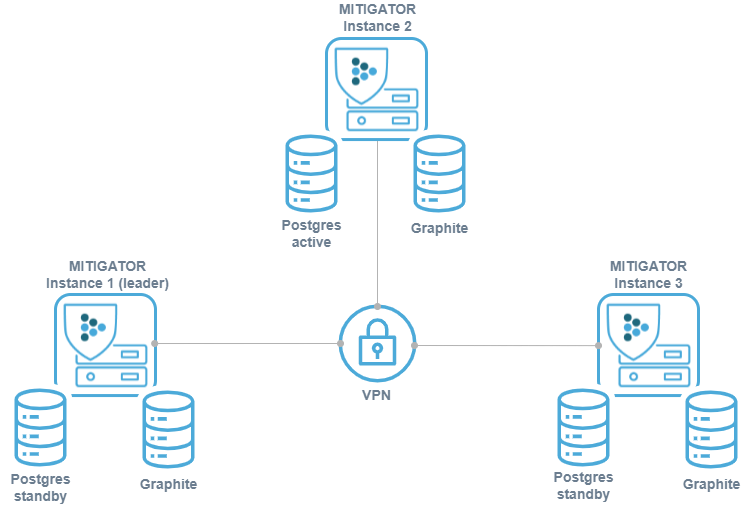
If the cluster is assembled from MITIGATOR instances that previously worked independently, then conflicts may arise during the integration. Therefore, on all instances except the future leader, you must execute the command:
Info
Executing this command will delete countermeasure settings, event log, graphs, and other information stored in the databases of these instances. If the data needs to be saved, you must first perform backup.
PostgreSQL instances run in a streaming replication scheme active — hot standby. Instead of connecting directly to PostgreSQL, each MITIGATOR connects to a local running program pgfailover that redirects connections to the PostgreSQL Primary.
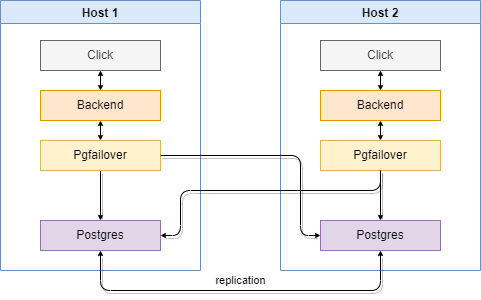
If no Primary is available, pgfailover promotes one of the Standby
replicas to Primary according to the given order. The MITIGATOR
cluster leader and the Primary do not have to be on the same instance.
It is assumed that there is reliable communication between the nodes. If a group of instances is cut off from the Primary, a new Primary (split-brain) will be selected among them. After the connection is restored, you will have to manually delete the data on the cut off part of the instances and re-enter them into the cluster.
For fault tolerance in case of leadership transition, the current leader instance can
write metrics data to multiple servers.
The list of servers is specified in the FWSTATS_GRAPHITE_ADDRESS variable of the fwstats service.
It is recommended to specify the addresses of all instances with their own Graphite subsystem.
The default value is set in the docker-compose.failover.yml file and configured to
writing to two servers.
For better UI experience, requests for rendering graphs can be distributed among the servers.
The list of servers is specified in the CARBONAPI_BACKENDS variable of the carbonapi service,
It is recommended to specify the addresses of all instances with their own Graphite subsystem.
The default value is specified in the docker-compose.failover.yml file and configured to
reading from two available servers.
Setup
The configuration process is described for two instances. For more instances,
expand the lists of servers in pgfailover, FWSTATS_GRAPHITE_ADDRESS
and CARBONAPI_BACKENDS.
pgfailover identifies the local database by the instance’s
MITIGATOR_VPN_ADDRESS (set during VPN setup). This
value is unique per instance, so no extra configuration is needed. Worker
instances (no local database) use docker-compose.worker.failover.yml,
which disables promotion.
-
Set the variable
MITIGATOR_HOST_ADDRESS=192.0.2.1in the.envfile. Here,192.0.2.1is an IP address for container-to-host access. It is usually the IP address of the MGMT interface for this specific instance. Do not use domain names: connectivity will break in case of a DNS failure. -
Set the variable
MITIGATOR_PUBLIC_ADDRESS=192.0.2.1in the.envfile. Here,192.0.2.1is an IP address or domain name for API and UI clients. It is usually the same asMITIGATOR_HOST_ADDRESS. -
In the
.envfile, set the variablesSERVER1=10.8.3.1andSERVER2=10.8.3.2. Here,10.8.3.1and10.8.3.2are the addresses of the servers inside the VPN that are running the instances. -
In the MITIGATOR web interface set real IP addresses of packet processors.

-
Create
docker-compose.failover.ymlbased on template:For 3+ servers or a non-default DSN, put extensions in
docker-compose.override.yml(overridePGFAILOVER_SERVERS, and if neededFWSTATS_GRAPHITE_ADDRESS,CARBONAPI_BACKENDS). -
In the
.envfile, set theCOMPOSE_FILEvariable like this:
Usage
-
Stand with Active base starts as usual:
docker-compose up -d -
A stand with Standby is initialized with a replica:
docker-compose run --rm -e PGPORT=15432 postgres standbyafter which it starts as usual:
docker-compose up -d
If the instance hosting the Primary database becomes unreachable, an instance with a Standby database takes its place and becomes the new Primary. Switching the former Primary’s database back to Standby mode is not handled by regular PostgreSQL replication. For a two-database scheme, this means stopping replication to the other server until the scheme is manually reconfigured.
Restoring Standby from Active
To switch the former Active and return it to the replication scheme, you must stop the PostgreSQL service and delete the local database data.
-
Stop the PostgreSQL service and delete anonymous volumes:
docker-compose rm -fsv postgres -
Standby initialization is similar to the first initialization:
docker-compose run --rm -e PGPORT=15432 postgres standbythen run as usual:
docker-compose up -d
Leadership conflict
In the case of split brain, each isolated part of the cluster will have its own Primary, that is, the cluster will split into several smaller ones (possibly from a single machine).
After pgfailover connectivity is restored, all smaller clusters will find
that there are multiple PostgreSQL servers acting as Primary.
In each of the clusters, an alert will be triggered about this situation,
log event «Instance leadership conflict occurred» will be generated.
In the logs of each backend-leader (docker-compose logs backend)
there will be a message like this:
In the data field:
senderis the index of the instance that notifies on what had happened (the position of its own address inPGFAILOVER_SERVERS).primaryis the index of the instance thatsenderreads as a valid Primary.rivalsis a list of instance indexes on which PostgreSQL is running as Primary besides the one specified inprimary.
It is necessary to analyze such records in the logs of all instances, choose which one will be the Primary, and make Standby the rest.
Related Content
- Hybrid Deployment Schemes
- External Fault-Tolerant Storage
- Shared Non-Redundant Storage
- Pgfailover Documentation
- Ways to Integrate MITIGATOR into the Network
- Access to the Grafana Interface
- Challenge-response Authentication Module for HTTP/HTTPS
- Graphite on a Separate Server
- Hardware Bypass
- Managing BGP Announcements When the External Router is Inactive